If your mini sewing machine is not stitching, first separate a needle that will not move from a moving needle that leaves holes but no seam. For no movement, check the documented power and control arrangement. For missing stitches or tangles, disconnect power and check the needle, thread path and bobbin against your model’s manual before adjusting tension.
Separate power from stitch formation
| Observed symptom | First distinction |
|---|---|
| Nothing responds | Check the documented power arrangement and controls. |
| Light works, needle does not move | A working light does not establish a working motor or pedal. |
| Needle moves, no formed seam | Check the complete thread path and lower-thread pickup where required. |
| Seam starts, then tangles | Stop and inspect the permitted threading, bobbin placement and fabric setup. |
Disconnect adapter and battery power before touching the thread path or needle area. If the machine uses different positions for automatic running and pedal operation, establish those from its own instructions. Do not assume the front “off” label isolates all power.
If nothing moves, describe the control response
Record whether the light, motor and needle respond separately. A working light alone does not identify a pedal fault or prove that the motor has power. Check only the supply and mode arrangement documented for the exact machine; do not substitute a stronger adapter. The adapter, battery and USB guide explains what each power claim does and does not establish.
If the instructions distinguish button-operated sewing from pedal mode, note which mode failed. This gives support a specific symptom without requiring you to open the mechanism or diagnose an electrical component.
If the needle moves but leaves no seam
Needle holes show motion, not stitch formation. With power removed, compare the installed needle, upper route and lower bobbin placement with the matching diagrams. On a two-thread machine, the lower-thread pickup step matters; a missed pickup is a different observation from a thread that repeatedly breaks.
For the complete first-time sequence, follow the mini setup guide and the model’s own manual. Record whether a seam never forms or begins correctly before failing. Do not bend the needle to make it catch the lower thread.
If a seam forms and then tangles
Save the sample and identify the first failed point. Did the problem start after replacing thread, selecting reverse, or reaching a folded join? Those observations narrow the question; they do not prove a tension, timing or motor defect.
- After a thread change: verify the documented route and bobbin seating before adjusting tension.
- During reverse: confirm the permitted reverse sequence and report whether forward stitching still works.
- At a thick intersection: stop if the construction will not fit or feed normally; do not pull it through.
Once the documented setup has been restored, use suitable scrap and change only one permitted setting at a time. Persistent failure under that basic setup is useful information for support, not a reason to keep improvising.
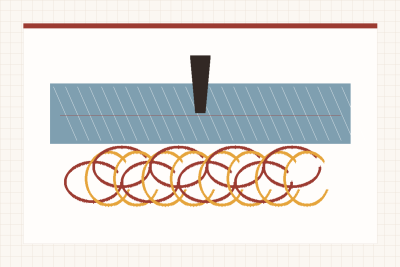
Loops underneath do not automatically mean a bobbin fault
The side carrying the loose thread is not enough to identify the cause. Singer’s troubleshooting guidance connects underside loops with the upper threading route and tension mechanism. Use that as a reason to check the complete route, not as permission to copy a Singer threading diagram onto a different mini.
First restore the documented setup
Disconnect power, then compare each guide, take-up point and bobbin position with your model’s instructions. Use the specified presser-foot and needle positions for threading. Avoid changing the bobbin-case screw to compensate for an upper thread that is incorrectly routed.
Then assess the seam
If the documented setup is correct, follow its permitted tension adjustments on suitable scrap. A numbered dial is a reference scale, not a universal fabric recipe: “4” or “6” cannot be prescribed for every mini, thread and fabric.
Owner experiences illustrate why the outcome matters more than endless adjustment. A JUCVNB owner described resolving initial threading trouble with adjustments and completing alterations. A BJSWNLY 12-stitch owner reported persistent skipping and tangling despite help from an experienced sewist. Neither account diagnoses your machine; the second is a reminder that continuing indefinitely is not a useful troubleshooting plan.
When forward sewing works but reverse fails
- Confirm the function exists. A fixed forward-only mini cannot gain reverse through tension changes. Check the exact model, not a similar-looking machine’s listing.
- Describe what changes. Does fabric stop feeding, continue forward or begin tangling when the permitted reverse control is used? Report the observable behavior rather than calling all three a broken reverse motor.
- Use the model’s sequence. Whether a lever must be held and when it may be operated are instruction-specific. Do not force a control or change stitch selection while the needle is embedded in fabric.
If the reverse control still does not behave as documented after the permitted checks, stop relying on it to secure a repair and contact support. If the machine has no reverse by design, follow its documented seam-finishing method instead.
Do not force recovery
A handwheel that binds, a needle that contacts surrounding parts or a foot that cannot accept the seam calls for reassessment. Do not force the wheel, pull the fabric through or copy an owner’s improvised disassembly. Follow the model’s maintenance instructions and use support when the permitted checks do not resolve the issue.
Abnormal heat, a burning smell or failure to stop belongs in a different category from a missed thread guide. Take the unit out of use and seek support. Some supplied owner files describe these faults; this guide does not diagnose their causes or suggest continuing until the machine loosens up.
What to record if the documented checks do not resolve it
- Machine and setup: exact model, power source and selected operating mode.
- Observable symptom: no movement, needle motion without stitches, or a seam that later fails.
- Point of failure: after a thread change, during reverse or at a folded join. Keep the failed sample.
- Checks already completed: the manual’s needle, threading and bobbin steps, and the result on suitable scrap.
Give that information to support instead of continuing to change settings. Stop using a machine with abnormal heat or a failed stop control; do not force a binding mechanism.
If the machine works but its controls or space remain unsuitable, the mini versus full-size comparison helps separate a format mismatch from a setup problem.