Sewing Machine Guide

  • Home
  • Reviews
  • Best
    • All Best Picks
    • Computerized
    • Embroidery
    • Mechanical
    • Quilting
  • Guides
    • All Sewing Guides
    • Computerized
    • Embroidery
    • Mechanical
  • Comparisons
    • All Comparisons
    • Computerized
    • Embroidery
    • Mechanical
    • Straight-Stitch
  • Favorites
Home / Embroidery Machines / Best / 5 Best Brother Embroidery Machines for Home Use

5 Best Brother Embroidery Machines for Home Use

The Brother SE2000 is our strongest all-around home choice when sewing and 5×7 embroidery both matter. The PE900 is the cleaner buy for embroidery-only work, while the SE700 makes more sense when compact 4×4 projects and lower complexity are the priority.

OUR PICKS

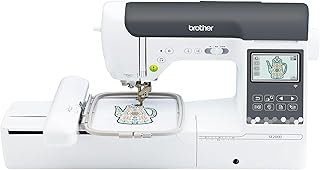
Brother SE2000 Review: A 5×7 Combo Machine With Room to Grow

Best overall home combo

Brother SE2000 Review: A 5×7 Combo Machine With Room to Grow

Check price at Amazon Jump to details
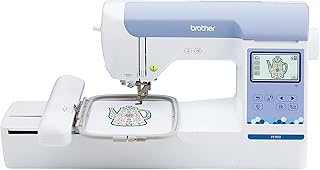
Brother PE900 Review: Why the 5×7 Hoop Is the Real Upgrade

Best embroidery-only choice

Brother PE900 Review: Why the 5×7 Hoop Is the Real Upgrade

Check price at Amazon Jump to details
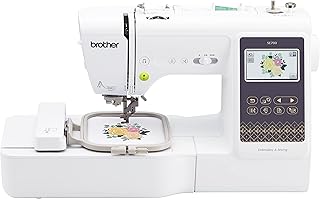
Brother SE700 Review: Accessible 4×4 Sewing and Embroidery

Best compact beginner combo

Brother SE700 Review: Accessible 4×4 Sewing and Embroidery

Check price at Amazon Jump to details
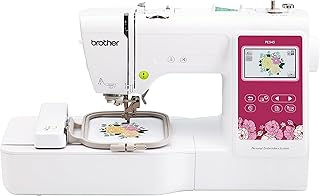
Brother PE545 Review: A Friendly 4×4 Embroidery Starting Point

Best conventional 4×4 pick

Brother PE545 Review: A Friendly 4×4 Embroidery Starting Point

Check price at Amazon Jump to details
Brother Skitch PP1 Review: App-First Embroidery With Tradeoffs

Best magnetic-frame workflow

Brother Skitch PP1 Review: App-First Embroidery With Tradeoffs

Check price at Amazon Jump to details

The best Brother embroidery machines for home use separate into two decisions before model numbers matter: whether you need regular sewing in the same body, and whether a 4×4-inch embroidery field is genuinely large enough. For a buyer who expects to sew garments and embroider medium designs, the Brother SE2000 is the strongest all-around choice in this five-machine group. If a separate sewing machine is already on the table, the PE900 delivers the same useful 5×7 field in a more focused embroidery-only format.

The less expensive 4×4 class is not automatically a poor choice. The SE700 can be a sensible first combination machine for patches, monograms, children’s garments and small motifs. The PE545 offers a conventional embroidery-only workflow at that size. The Skitch PP1 adds a magnetic frame and a phone-led interface, but its required Artspira connection creates a much sharper buying condition than ordinary wireless transfer.

Best all-around fitSE2000 for sewing plus 5×7 embroidery
Best focused routePE900 when ordinary sewing is already covered
Decision to make firstNative 4×4 or 5×7 embroidery field
Choose the embroidery field before the feature list. A larger accessory hoop cannot make a machine stitch one continuous design beyond its published 4×4 or 5×7 maximum area.

How we compared these Brother embroidery machines

This is an evidence-led comparison, not a hands-on test. We used the normalized exact-model specifications already stored with each review, Brother documentation captured during review production, and the supplied exact-ASIN Amazon review files. Those files contain between 76 and 100 owner texts per product. They are useful for identifying recurring setup and ownership themes, but they are not random samples and cannot establish failure rates.

The order follows four criteria selected for a home embroidery buyer:

30%Project coverageRegular sewing capability and a field that fits likely home projects.
25%Embroidery workflowField size, design transfer, onboard control and documented automation.
25%Setup and controlLearning burden, independent controls and dependencies that can interrupt work.
20%Ownership confidenceRecurring threading, tension, connection, arrival and support themes.

We did not award points for Amazon star averages, and we did not treat a longer decorative-design list as proof of better stitch quality. Evidence confidence is also separate from machine quality: missing documentation reduces how strongly we can make a claim, not necessarily how well the machine works.

Start with the workflow you cannot compromise on

Your non-negotiable Machine requirement What to reject
You need one machine for garments and embroidery A true sewing-and-embroidery combination model with a removable embroidery unit Embroidery-only models, even when their product pages use the word “sewing” broadly
Your planned names or motifs exceed 4 inches in one direction A published 5×7-inch maximum field The claim that repositioning or buying a larger hoop turns a 4×4 machine into a 5×7 machine
You want operation without depending on a phone An onboard color screen plus a documented USB or conventional transfer route An app-required machine whose useful controls live primarily on a mobile device
You frequently embroider finished small items Easy framing and physical access around pockets, cuffs or bags A large flat setup chosen only for specifications that the project does not need

This matrix deliberately describes requirements rather than repeating the five picks. Once the non-negotiable is clear, the detailed cards below show which product meets it with the fewest unwanted compromises.

The 4×4 versus 5×7 decision is about layout, not prestige

A 4×4 field measures about 100 × 100 mm. It suits many pocket motifs, patches, small names and compact monograms. It can also be a useful learning boundary: smaller designs finish faster, use less stabilizer and make mistakes less expensive. The problem appears when the project list already includes longer lettering, larger shirt designs or layouts that should stitch as one uninterrupted file.

The 5×7 class expands the usable area to roughly 130 × 180 mm. That is not simply seventy-five percent more marketing space. The rectangular field changes the proportions available for names, borders and medium motifs and reduces the need to split or realign a design. Both the SE2000 and PE900 provide this field; their real difference is whether ordinary sewing belongs in the same purchase.

Choose 4×4 when

Small work is the actual plan

Patches, pockets, compact monograms and short names fit the smaller field without paying for unused space.

Choose 5×7 when

Layout flexibility matters

Longer lettering and medium rectangular motifs can stitch as one design with fewer alignment steps.

Do not assume

A larger hoop changes the limit

The accessory may help with positioning, but it does not expand the machine’s published stitch field.

Several supplied PE545 and SE700 owners were satisfied with small work yet later wished they had started with a larger field. That does not make the 4×4 models bad starter machines. It means “beginner” should describe the user’s workflow, not a machine that must be replaced as soon as the first planned design is measured.

Can repositioning replace a larger field?

Rehooping or using a repositionable frame can place multiple 4×4 sections on one item, but each section remains a separate alignment task. It can work for deliberately split files. It is not equivalent to stitching one native 5×7 design, and registration errors become more visible when borders or lettering must meet precisely.

Combination or embroidery-only changes the value equation

The SE2000 and SE700 are combination machines. Remove the embroidery unit and they perform ordinary sewing with a foot controller, speed control and utility stitches. This makes one machine cover garment construction, repairs and decorative work, but it also means one body must be changed between modes. A buyer who sews while an embroidery design is running cannot do both jobs simultaneously.

The PE900 and PE545 are embroidery-only machines. Their value is focus: there is no reason to pay for another ordinary sewing interface when a dependable sewing machine already exists. The PE900 is especially persuasive in that situation because it preserves the 5×7 field, 193 built-in designs and an onboard color touchscreen. Read the full PE900 review when field size and thread-handling details are the central decision.

Combination route

One body, two workflows

Choose this when garments, repairs and embroidery need to share one table and purchase.

Embroidery-only route

One job without duplication

Choose this when a dependable sewing machine is already available or must remain free during embroidery.

Embroidery-only means exactly that. Neither the PE900 nor PE545 can construct an ordinary seam. A familiar sewing-machine silhouette does not make either model a substitute for a domestic sewing machine.

Wireless transfer is not one identical feature

Four machines in this group combine an onboard display with wireless design routes, while the Skitch PP1 moves much of the workflow to a compatible mobile device. That difference matters more than a simple yes/no wireless row.

On the PE545, PE900, SE700 and SE2000, Artspira is one route into a broader machine interface. The stored documentation also identifies Design Database Transfer, and the embroidery-only PE models include a documented USB route. If a wireless setup is awkward, the machine still has an onboard color screen for selecting and positioning compatible designs already available to it.

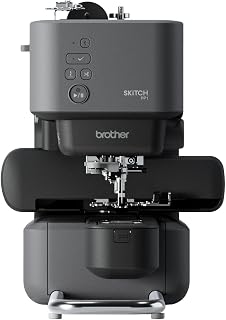
The Skitch requires Artspira to operate. Its magnetic 4×4 frame and narrow working shape are genuinely useful for some small finished items, and successful owners describe attractive results. The same supplied review pool contains repeated complaints about pairing, firmware, bobbin seating, tangles and support. Choose it only after treating the app, account and compatible phone as parts of the machine rather than free extras. The Skitch PP1 review explains that dependency in greater detail.

What the owner evidence changes

When setup works: owners describe clean lettering, patches, garments, gifts and small-business experiments, with guided screens and automatic functions reducing repetitive work.
Where projects stall: needle breaks, thread nests, bobbin or tension trouble and failed transfers recur across more than one product pool.
What that evidence means: the reports do not establish failure rates, but they support testing the complete workflow rather than confirming only that the machine powers on.

Model-specific patterns influence the order. The 5×7 machines offer more growth room. The SE2000’s owner evidence supports a credible mixed sewing-and-embroidery role, while the PE900 avoids charging an embroidery-only buyer for duplicate sewing capability. The SE700 earns a strong compact-combo position. The PE545 remains a conventional dedicated 4×4 option. The Skitch’s magnetic frame is distinctive, but the required app and stronger recurring connection complaints make its recommendation narrower.

Budget for the first finished project, not just the box

Every machine here needs consumables and technique that are easy to omit from a product-price comparison. Stabilizer must match the fabric and design density. Embroidery thread, bobbin thread and needles need to suit the machine and project. Purchased design files must fit the field and use a compatible, properly digitized format. A larger built-in library does not remove those requirements.

  • Stabilizer: plan for tear-away, cut-away or wash-away material according to the project rather than using one backing for everything.
  • Thread and needles: buy a small, reliable set first and diagnose the thread path before collecting dozens of colors.
  • Hoops and frames: confirm that an accessory is compatible, then remember that it cannot exceed the machine’s native stitch field.
  • Design software: distinguish transfer from digitizing. Sending a valid file to the machine is different from converting artwork into good stitch instructions.
  • Training and support: determine whether an online purchase includes dealer help and whether local service will accept the model.

Five checks to complete while returns are simple

  1. Verify identity and contents. Confirm the model, market version, embroidery unit or frame, foot, bobbins, power accessories and documentation against the exact listing.
  2. Use a built-in design first. Stable woven fabric, fresh thread, the correct needle and appropriate stabilizer remove several variables from the first test.
  3. Exercise thread handling. Wind and seat the bobbin, use the threader, pause and restart, change colors and check the underside before blaming a downloaded file.
  4. Test every transfer route you expect to use. Connect wireless tools, import a known-compatible design and verify any USB fallback. Skitch buyers should also test account recovery and app reconnection.
  5. Test both modes on a combination machine. Run straight and zigzag seams, speed control, reverse, a buttonhole and a complete embroidery design before deciding that the SE700 or SE2000 is sound.

For a closer look at the lower-cost mixed workflow, the SE700 review separates the machine’s ordinary-sewing strengths from the permanent 4×4 boundary. You can also browse more embroidery machines as new models are added.

Best overall home combo

Brother SE2000 Review: A 5×7 Combo Machine With Room to Grow

Brother SE2000 Review: A 5×7 Combo Machine With Room to Grow

Get it now:

Check latest price

What to know

  • Growth room: A native 5×7 field handles medium names and motifs without a split-file workaround.
  • Two real workflows: 241 sewing stitches and 193 embroidery designs make neither mode an afterthought.
  • Home control: A 3.7-inch color touchscreen, speed slider and foot controller support mixed use.
  • Owner signal: Successful finished work appears beside a meaningful setup and arrival-check burden.

Best if

  • You need regular sewing and native 5×7 embroidery in one machine
  • You expect medium layouts and want room beyond entry-level 4×4 work
  • You will test both modes and learn hooping, stabilizer and file preparation

Skip if

  • You already own a sewing machine and would duplicate its function
  • You want the shortest learning path for occasional small monograms
  • You expect embroidery to work like printing an ordinary image

Why it leads this home-use list

The SE2000 avoids two common reasons to replace a first embroidery machine: it provides a native 5×7 field and a capable regular-sewing side. That combination puts it ahead for a committed hobbyist who expects to make garments, quilted projects and medium embroidery layouts at one table. The stored record lists 241 sewing stitches, 193 embroidery designs, an 850-stitch-per-minute sewing ceiling and wireless transfer through Brother’s current ecosystem.

Its advantage is coverage, not simplicity. The supplied 76-review set includes owners who praise clean lettering, multicolor results and the convenience of one versatile platform. It also contains a detailed beginner account involving hours of learning and broken needles, plus reports of needle-position faults and damaged arrivals. Those reports cannot establish a defect rate, but they justify testing both modes promptly.

Choose the SE2000 when both workflows will be used. Move to the PE900 if embroidery is the only missing capability; move to the SE700 if every planned design fits 4×4 and reducing purchase complexity matters more than growth room.

Machine classSewing and single-needle embroidery combination
Regular sewingYes — 241 sewing stitches
Maximum embroidery area5 × 7 inches / 130 × 180 mm
Built-in embroidery designs193
Design transferWireless LAN, Artspira and Design Database Transfer
On-machine display3.7-inch color LCD touchscreen
Thread cutterNot published in normalized record
Jump-stitch trimmingNot published
Color sortingNot published
Best embroidery-only choice

Brother PE900 Review: Why the 5×7 Hoop Is the Real Upgrade

Brother PE900 Review: Why the 5×7 Hoop Is the Real Upgrade

Get it now:

Check latest price

What to know

  • Purpose-built role: Embroidery-only hardware for a home that already has ordinary sewing covered.
  • Useful field: Native 5×7 space changes lettering and medium-layout options.
  • Documented automation: Color sorting and jump-stitch trimming can reduce repetitive handling.
  • Owner signal: Field size earns praise, while tension, threading and arrival checks remain important.

Best if

  • You already own a sewing machine and want focused 5×7 embroidery
  • You value color sorting and documented jump-stitch trimming
  • You want wireless transfer with an onboard screen and USB route

Skip if

  • You need one purchase to construct seams as well as decorate them
  • Your work is limited to occasional 4×4 patches or monograms
  • You need automatic multi-needle color changes for production

The focused 5×7 alternative

The PE900 becomes the more rational first choice when regular sewing is already covered. It keeps the medium 5×7 field and 193 built-in designs without asking the buyer to pay for or switch around a second sewing system. Within this roster, it also has the clearest documented embroidery automation: a 650-stitch-per-minute ceiling, color sorting and automatic jump-stitch trimming.

The supplied 100-review set repeatedly treats the larger field as useful rather than decorative. Owners also value wireless transfer and finished stitch appearance when setup succeeds. The tradeoff is that “automatic” does not remove technique. Threading, bobbin-case tension, stabilizer choice and file quality still generate learning friction, and some buyers describe damaged, incomplete or incorrectly configured arrivals.

Choose the PE900 for a dedicated home embroidery station with native 5×7 space. The SE2000 earns the higher overall position only because it adds capable sewing. If small 4×4 work is certain to remain the limit, the PE545 provides a simpler reason to spend less.

Machine classSingle-needle embroidery-only
Regular sewingNo
Maximum embroidery area5 × 7 inches / 130 × 180 mm
Built-in embroidery designs193
Design transferWireless LAN, Artspira, Design Database Transfer and USB
On-machine display3.7-inch color LCD touchscreen
Thread cutterYes
Jump-stitch trimmingYes
Color sortingYes
Best compact beginner combo

Brother SE700 Review: Accessible 4×4 Sewing and Embroidery

Brother SE700 Review: Accessible 4×4 Sewing and Embroidery

Get it now:

Check latest price

What to know

  • Compact two-mode path: Ordinary sewing and 4×4 embroidery share one home machine.
  • Beginner control: Speed slider, color display and guided resources reduce several early barriers.
  • Known ceiling: The 100 × 100 mm field is appropriate only when projects are selected around it.
  • Owner signal: Value and quiet use recur alongside mixed reports from both operating modes.

Best if

  • You want to learn sewing and embroidery on one compact platform
  • You prefer a speed slider and onboard controls to an app-first workflow
  • You will test seams, buttonholes and embroidery during the return period

Skip if

  • Your first-project list already contains designs larger than 4×4
  • You own a sewing machine and need only dedicated embroidery
  • You want a machine chosen mainly for medium or business-scale layouts

Choose it when 4×4 is a deliberate limit

The SE700 is the balanced entry point for someone who wants to learn ordinary sewing and machine embroidery without buying two bodies. Its 103 sewing stitches, ten one-step buttonholes, speed control and eight included feet give the construction side enough substance for garments, repairs and crafts. The removable embroidery setup adds a 4×4 field, 135 designs and wireless transfer.

That smaller field explains both its accessibility and its third-place position. It keeps early projects compact, but no accessory can turn it into native 5×7 hardware. In the supplied 100-review set, beginners often describe helpful prompts, tutorials, quiet operation and good value. Other accounts mention looping, bobbin thread showing on top, needle problems and frustration with ordinary sewing. These are reasons to test both modes, not proof that every unit shares a fault.

Choose the SE700 when the measured project list fits 4×4 and one compact combo is the goal. Pay more for the SE2000 before building a supply collection if longer names or medium motifs are already planned.

Machine classSewing and single-needle embroidery combination
Regular sewingYes — 103 sewing stitches
Maximum embroidery area4 × 4 inches / 100 × 100 mm
Built-in embroidery designs135
Design transferWireless LAN, Artspira and Design Database Transfer
On-machine display3.2 × 1.8-inch color LCD area
Thread cutterYes
Jump-stitch trimmingNot published
Color sortingNot published
Best conventional 4×4 pick

Brother PE545 Review: A Friendly 4×4 Embroidery Starting Point

Brother PE545 Review: A Friendly 4×4 Embroidery Starting Point

Get it now:

Check latest price

What to know

  • Dedicated entry: Embroidery-only design avoids paying for a second ordinary sewing mode.
  • Independent control: A 3.7-inch color screen remains available alongside wireless and USB transfer.
  • Small-project fit: The 4×4 field suits compact motifs only when that limit is chosen knowingly.
  • Owner signal: Easy early successes coexist with connection, thread-path and arrival complaints.

Best if

  • You already sew elsewhere and need a conventional 4×4 embroidery station
  • You want an onboard touchscreen plus wireless and USB choices
  • You are willing to learn stabilizer, thread path and compatible files

Skip if

  • You expect longer names or medium motifs in one uninterrupted field
  • You need regular seams or prefer one combination machine
  • You want automatic multi-color production or a no-tech craft tool

A dedicated starter without an app-only interface

The PE545 serves a narrow but coherent buyer: someone who already has ordinary sewing covered, knows that 4×4 designs are enough, and wants a conventional machine screen rather than moving the entire workflow onto a phone. It combines a 3.7-inch color touchscreen, 135 built-in designs, wireless routes and documented USB transfer in an embroidery-only body.

The supplied 77-review set includes many quick-start stories and successful patches, bags, clothing details and monograms. It also contains owners who struggled with Wi-Fi, updates or file transfer, plus reports of skipped areas, broken needles, jams and defective arrivals. The smaller sample reduces confidence compared with the 100-text sets; it does not by itself make the machine worse.

Choose the PE545 when focus and familiar onboard control matter more than field growth. The SE700 is a better value question when regular sewing is still needed. The PE900 is the stronger long-term dedicated purchase when even a few planned designs cross the 4-inch boundary.

Machine classSingle-needle embroidery-only
Regular sewingNo
Maximum embroidery area4 × 4 inches / 100 × 100 mm
Built-in embroidery designs135
Design transferWireless LAN, Artspira, Design Database Transfer and USB
On-machine display3.7-inch color LCD touchscreen
Thread cutterYes
Jump-stitch trimmingNot published
Color sortingNot published
Best magnetic-frame workflow

Brother Skitch PP1 Review: App-First Embroidery With Tradeoffs

Brother Skitch PP1 Review: App-First Embroidery With Tradeoffs

Get it now:

Check latest price

What to know

  • Distinctive frame: A magnetic 4×4 frame simplifies repositioning for some small ready-made items.
  • Required ecosystem: A compatible mobile device and Artspira connection are parts of normal operation.
  • Limited independence: Design control does not live on a conventional onboard touchscreen.
  • Owner signal: Attractive successes sit beside recurring connectivity, bobbin and thread-management complaints.

Best if

  • You specifically value a magnetic frame for small finished items
  • You are comfortable treating a phone, account and app as machine components
  • You have strong return rights and will test pairing, firmware and bobbin handling immediately

Skip if

  • You require offline operation or a conventional onboard design screen
  • You want USB fallback or minimal dependence on changing software terms
  • You need 5×7 layouts, faster throughput or production-oriented color changes

The frame is appealing; the dependency decides

The Skitch PP1 is not a conventional budget substitute for the machines above. Its case rests on a magnetic 4×4 frame, a compact free-arm-style working area and phone-based design control. Those choices can make repositioning and working on some finished small items feel more direct, especially for a mobile-app-comfortable hobbyist.

They also create the roster’s firmest boundary. Brother documents an Artspira connection as required, and the machine has no equivalent onboard design touchscreen. Across the supplied 100-review set, successful owners praise clean small designs and the magnetic frame. Recurring complaints involve Bluetooth or app access, firmware, bobbin seating, thread nests, jams and support. Paid features or content can also affect the ownership expectation even when a free app tier is available.

Choose the Skitch only when its physical framing advantage outweighs app dependence and you have strong return options. The PE545 is the safer conventional 4×4 route when onboard controls and USB fallback matter. The fifth-place rank reflects workflow risk for this audience, not a claim that every Skitch unit fails.

Machine classApp-driven single-needle embroidery-only
Regular sewingNo
Maximum embroidery area4 × 4 inches / 100 × 100 mm
Built-in embroidery designsNot published
Design transferBluetooth / Artspira connection required
On-machine displayNo onboard design touchscreen; mobile device required
Thread cutterYes
Jump-stitch trimmingNot published
Color sortingNot published

Product Comparison

Feature Brother SE2000 Review: A 5×7 Combo Machine With Room to Grow Brother PE900 Review: Why the 5×7 Hoop Is the Real Upgrade Brother SE700 Review: Accessible 4×4 Sewing and Embroidery Brother PE545 Review: A Friendly 4×4 Embroidery Starting Point Brother Skitch PP1 Review: App-First Embroidery With Tradeoffs
Product Image
Brother SE2000 Review: A 5×7 Combo Machine With Room to Grow
Brother PE900 Review: Why the 5×7 Hoop Is the Real Upgrade
Brother SE700 Review: Accessible 4×4 Sewing and Embroidery
Brother PE545 Review: A Friendly 4×4 Embroidery Starting Point
Brother Skitch PP1 Review: App-First Embroidery With Tradeoffs
Rating
4.1 / 5
4.0 / 5
4.0 / 5
3.6 / 5
3.1 / 5
Category Computerized Sewing Machines, Embroidery Machines Embroidery Machines Computerized Sewing Machines, Embroidery Machines Embroidery Machines Embroidery Machines
Stitch Quality & Control
4.4 / 5.0
4.3 / 5.0
4.1 / 5.0
3.9 / 5.0
3.4 / 5.0
Ease of Setup & Use
3.7 / 5.0
3.8 / 5.0
3.9 / 5.0
3.7 / 5.0
2.8 / 5.0
Fabric & Project Fit
4.5 / 5.0
4.3 / 5.0
4.1 / 5.0
3.5 / 5.0
3.1 / 5.0
Build, Accessories & Value
3.9 / 5.0
3.7 / 5.0
4.0 / 5.0
3.4 / 5.0
3.0 / 5.0
Brand Brother Brother Brother Brother Brother
Exact model SE2000 PE900 SE700 PE545 Skitch PP1
ASIN B0B835KJFF B0B8337QHR B0B8DYP1RN B0B8DSJKTH B0CC3116H3
Machine class Computerized sewing and single-needle embroidery combination machine Single-needle embroidery-only machine Computerized sewing and single-needle embroidery combination machine Single-needle embroidery-only machine App-driven single-needle embroidery-only machine
Control type 3.7-inch touchscreen, buttons, foot controller and wireless transfer 3.7-inch color touchscreen and start/stop controls Color LCD, buttons, speed slider, foot controller and wireless transfer 3.7-inch color touchscreen and start/stop controls Required Artspira mobile app plus limited physical buttons
Primary functions Garment sewing, quilting and programmed embroidery Programmed machine embroidery Garment sewing, crafts and 4×4 embroidery Programmed machine embroidery Small programmed embroidery and personalization
Built-in stitches / applications 241 sewing stitches Embroidery only 103 sewing stitches Embroidery only Embroidery only; designs accessed through Artspira
Maximum sewing speed 850 stitches per minute 650 embroidery stitches per minute 710 stitches per minute 400 embroidery stitches per minute 400 embroidery stitches per minute
Speed control Slider and foot controller Not published Slider and foot controller Embroidery speed setting Not published
Needle stop up/down Yes Not published Yes Not published Not published
Needle threader Automatic Advanced automatic Advanced Advanced Automatic / assisted
Thread cutter Not published Yes Yes Yes Yes
Bobbin / looper system Quick-set drop-in bobbin Quick-set drop-in bobbin Quick-set drop-in bobbin Quick-set drop-in bobbin Quick-set bobbin
Workspace right of needle Not published 7.4 inches Not published 6.4 × 4.0 inches work area Not published
Display 3.7-inch color LCD touchscreen 3.7-inch color LCD touchscreen 3.2 × 1.8-inch color LCD area 3.7-inch color LCD touchscreen No onboard design touchscreen; compatible mobile device required
Included presser feet 8 1 embroidery foot 8 1 embroidery foot Not published
Dimensions 17.56 × 9.49 × 11.81 inches 17.48 × 9.49 × 11.81 inches 16.50 × 7.76 × 12.09 inches 16.50 × 7.76 × 12.09 inches 17 × 9 × 12 inches
Weight 20.5 lb 17.64 lb 15.06 lb 14.07 lb 16.6 lb
Warranty Brother 1/2/25-year limited warranty Brother 1/2/25-year limited warranty Brother 1/2/25-year limited warranty Brother 1/2/25-year limited warranty Brother 1/2/25-year limited warranty
Buttonholes / eyelets 10 one-step buttonholes Not published 10 one-step buttonholes Not published Not published
Maximum embroidery area 5 × 7 inches / 130 × 180 mm 5 × 7 inches / 130 × 180 mm 4 × 4 inches / 100 × 100 mm 4 × 4 inches / 100 × 100 mm 4 × 4 inches / 100 × 100 mm
Built-in embroidery designs 193 193 135 135 Not published
Embroidery fonts 13 13 10 10 Not published
Design transfer / connectivity Wireless: Wireless LAN, Artspira and Design Database Transfer Wireless: Wireless LAN, Artspira and Design Database Transfer; USB: Yes Wireless: Wireless LAN, Artspira and Design Database Transfer Wireless: Wireless LAN plus Artspira and Design Database Transfer; USB: Yes Wireless: Bluetooth / Artspira connection required
Thread sensors Not published Upper and bobbin Not published Upper and bobbin Upper and bobbin
Buy Now View Deal View Deal View Deal View Deal View Deal

Which Brother Embroidery Machine Should You Choose?

Best overall for this reader

The Brother SE2000 provides the most complete home-workshop path in this roster. Its 5×7 embroidery field avoids the most common entry-level size limitation, while its regular sewing controls make the second workflow substantial rather than decorative.

Choose another pick when

Select the PE900 if you already own a sewing machine and want a dedicated 5×7 body. Choose the SE700 for one compact machine and known 4×4 projects, or the PE545 for conventional embroidery-only 4×4 work. Choose the Skitch only when its magnetic frame outweighs required app control.

Check before buying

Measure planned designs, decide whether ordinary sewing belongs in the same machine, and verify the transfer route. During the return period, test a built-in design, custom transfer, bobbin handling, sensors and every included mode. These are single-needle home machines, not automatic color-changing production systems.

Frequently Asked Questions

Is a 5×7 embroidery machine better than a 4×4 machine?

It is better only when your projects need the additional field. A 5×7 area fits longer names and medium motifs without splitting them, while 4×4 can remain practical for patches, pockets and compact monograms. Measure several planned designs before choosing.

Should I buy a combination or embroidery-only machine?

Choose a combination machine if ordinary sewing and embroidery must share one workspace and budget. Choose embroidery-only when you already own a sewing machine or want to keep one machine embroidering while another constructs seams.

Can a larger hoop make a 4×4 Brother machine stitch 5×7 designs?

No. An accessory hoop can change framing or support repositioned sections, but it cannot expand the machine’s published maximum stitch field. A native 5×7 design requires a machine documented for that area.

Do Brother embroidery machines require an Artspira subscription?

The machines in this article have different workflows. Artspira is an optional transfer route on several conventional models, while the Skitch PP1 requires an Artspira connection to operate. Paid features and terms can change, so check the current app plan before purchase.

Can these machines embroider a custom logo from a picture?

A picture normally must be digitized into compatible stitch instructions before transfer. File transfer and digitizing are different jobs: an app or USB connection can move a valid design, but it does not guarantee that ordinary artwork will stitch cleanly.

Which machine is best if I already own a sewing machine?

The PE900 is the strongest dedicated choice in this roster when a 5×7 field is wanted. The PE545 costs less complexity for known 4×4 work. Compare current prices because paying for the SE2000’s regular sewing side may duplicate equipment you already have.

Are these Brother machines suitable for a home embroidery business?

They can support small-volume personalization, but all five are single-needle home machines and require manual color changes. Production buyers should calculate hoop size, changeover time, software, support and expected daily output before treating any of them as a business workhorse.

What should I test as soon as the machine arrives?

Verify the model and accessories, stitch a built-in design on stabilized woven fabric, test threading and bobbin seating, then try the transfer route you plan to use. Combination-machine buyers should also sew ordinary seams and a buttonhole during the return window.

×

About Sewing Machine Guide

Independent sewing machine reviews and practical buying guidance.

Your trusted source for honest, in-depth product reviews and comparisons.

Quick Links

  • Home
  • Reviews
  • Best Articles
  • Comparisons
  • Guides
  • About
  • Contact
  • Privacy Policy

Categories

  • Computerized Sewing Machines
  • Embroidery Machines
  • Handheld Sewing Machines
  • Industrial
  • Mechanical Sewing Machines
  • Mini Sewing Machines

© 2026 Sewing Machine Guide. All Rights Reserved.

As an Amazon Associate I earn from qualifying purchases. We may also earn from other retailer links. Affiliate disclosure