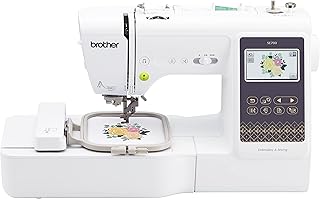
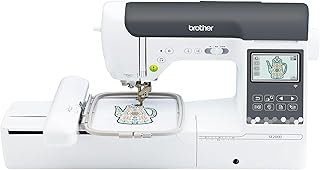
The Brother SE700 vs SE2000 decision is mainly a choice between a compact 4×4 combination machine and a heavier 5×7 model with more room in both embroidery and ordinary sewing. Choose the SE2000 when longer names, rectangular motifs or medium designs are already on the project list. Choose the SE700 when the work genuinely fits 4×4, portability matters and paying for unused field space would be wasteful.
Neither machine is a shortcut to production embroidery. Both are single-needle home combination machines, so color changes still require the user and design preparation still matters. A buyer who needs fields larger than 5×7, automatic multi-color changes or continuous commercial throughput should step outside this pair.
How this comparison was made
This comparison uses the normalized specifications stored with the two exact product records, available manufacturer information captured during the standalone reviews, and the customer-review files supplied for the same ASINs. The evidence includes 100 SE700 owner texts and 76 SE2000 owner texts. It supports recurring themes and concrete decision points; it does not represent every owner and cannot produce a defensible failure rate.
We did not physically test either machine. Published stitch counts, speed ceilings and field dimensions are treated as specifications rather than promises about finish quality. Owner reports are used where they help explain setup, usability and recurring trouble, with contradictions preserved instead of averaged away.
The embroidery field is the decisive upgrade
The SE700’s maximum field is 4 × 4 inches, or about 100 × 100 mm. The SE2000 expands that to 5 × 7 inches, roughly 130 × 180 mm. A simple area calculation gives 16 square inches for 4×4 and 35 square inches for 5×7, so the SE2000 provides a little more than twice the nominal stitching area. More important, its rectangular shape accommodates longer names, borders and medium motifs without splitting them into separately aligned sections.
Can a larger hoop turn the SE700 into a 5×7 machine?
No. A compatible repositionable hoop can help place separate sections, but it does not expand the machine’s native 4×4 stitch field. Multi-position work adds file preparation and alignment steps; it is not the same as sewing one continuous 5×7 design.
Both machines sew, but the SE2000 has more headroom
These are genuine sewing-and-embroidery combinations. In ordinary sewing mode, each offers speed control, a foot controller, ten one-step buttonholes and eight included presser feet. That common foundation is sufficient for repairs, garments and general craft work, assuming the fabric and technique remain within domestic-machine expectations.
The SE700 publishes 103 sewing stitches and a 710-stitch-per-minute maximum. The SE2000 publishes 241 stitches and an 850-stitch-per-minute ceiling. The larger library creates more decorative and utility choices, while the higher ceiling can reduce time on long seams. Neither number proves that the machine will feed every difficult fabric cleanly, and a beginner may use only a fraction of the 241 options.
Two real operating modes
Both machines construct ordinary seams and switch to single-needle embroidery with a removable unit.
Less weight to move
At 15.06 lb, its published weight is 5.44 lb below the SE2000’s 20.5 lb.
More sewing choices
Its 241-stitch library and 850-spm ceiling provide more capacity when ordinary sewing is a major part of the purchase.
Built-in embroidery content favors the SE2000
The SE700 includes 135 embroidery designs and ten embroidery fonts. The SE2000 lists 193 designs and thirteen fonts. Both use color displays and support wireless LAN, Artspira and Design Database Transfer, so the fundamental path for moving compatible designs is similar. The SE2000’s 3.7-inch touchscreen is larger than the SE700’s published 3.2 × 1.8-inch LCD viewing area.
More built-ins can be convenient on the first day, but they should not outweigh field size, file compatibility or the designs you will actually use. Transfer also is not digitizing: artwork must still be converted into appropriate stitch instructions before either machine can execute it well.
| Planned use | Better fit | Reason |
|---|---|---|
| Small monograms, patches and 4×4 motifs | SE700 | The smaller field covers the work without paying for unused capacity. |
| Long names, medium motifs and rectangular layouts | SE2000 | Native 5×7 space avoids splitting many designs. |
| Frequent garments plus occasional embroidery | SE2000 | More sewing stitches and a higher published speed ceiling add room to grow. |
| A machine moved between storage and the table | SE700 | Its published weight is 5.44 lb lower. |
| Automatic color changes or sustained production | Neither | Both are single-needle home machines that require manual thread changes. |
What owners add to the specification sheet
The SE700’s 100-review file contains recurring praise for value, a manageable learning path, tutorials and quiet operation. It also contains reports involving looping, bobbin thread appearing on top, needle trouble and frustration when ordinary sewing did not behave as expected. The mixed picture supports a complete two-mode return-period test rather than assuming that successful embroidery confirms the sewing side.
In the 76-review SE2000 file, successful owners describe clean lettering, multicolor projects and useful versatility. Other reports describe a learning curve, needle-position concerns, thread-management problems and units arriving damaged or problematic. The smaller review count is still substantial enough to identify questions, but neither set is a random survey and the difference in sample size should not be converted into a reliability ranking.
The price gap only makes sense against your project list
Current marketplace prices move too quickly to anchor the verdict to a fixed dollar difference. The durable question is what the upgrade buys: native 5×7 geometry, 193 instead of 135 embroidery designs, thirteen instead of ten fonts, 241 instead of 103 sewing stitches, a higher sewing-speed ceiling and a larger display. If those differences prevent a later machine replacement, the SE2000 can be the better value even at a higher price.
The SE700 is not merely the machine for someone who cannot afford the SE2000. It is the more efficient choice when 4×4 work is intentional, storage or lifting matters and the larger libraries would go mostly unused. Buying the smaller machine while already planning 5×7 files, however, turns the initial saving into a predictable limitation.
Run this arrival test before choosing to keep either machine
- Check identity and condition. Confirm the exact model, embroidery unit, hoop, feet, power equipment and visible shipping condition.
- Sew ordinary seams. Run straight and zigzag stitches, reverse, speed control and a buttonhole on stable woven fabric.
- Use a built-in embroidery design. Start with appropriate stabilizer, a fresh needle and known thread so the first test has fewer variables.
- Exercise thread handling. Wind and seat the bobbin, use the threader, pause, restart and complete at least one color change.
- Test the intended transfer route. Connect wireless tools and send a known-compatible file before assuming the software workflow fits your devices.
The full Brother SE700 review examines its compact combination workflow and 100-review evidence in more detail. The full Brother SE2000 review focuses on its larger field and mixed-workshop role. You can also browse more sewing-and-embroidery machines as the catalog grows.