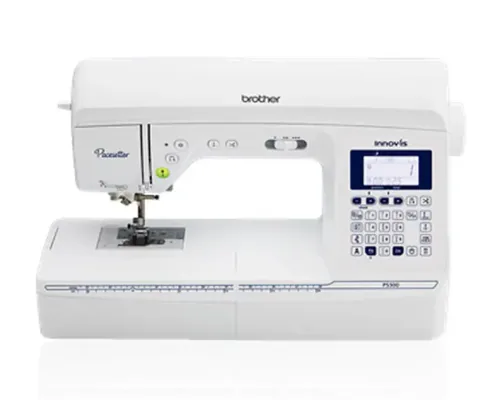
Repeated short seams reveal the Brother Pacesetter PS500’s purpose more clearly than its stitch count. The combination of automatic thread trimming, adjustable presser-foot pressure and an 8.3-inch workspace targets a sewist who wants more control over the routine between stitches—not simply more decorative patterns.
Follow one seam from positioning to removal
Needle positioning helps set a stopping point; the speed control limits the pace; the automatic cutter reduces the need to pick up scissors at the end. Those are distinct functions. Their value grows when a project contains many short construction seams or repeated pieces rather than one uninterrupted line of stitching.
Brother specifies 100 stitches, seven one-step buttonholes, four lettering fonts and up to 850 stitches per minute. None of those numbers measures how comfortably you can reach the controls. If possible, try ending a seam, cutting and repositioning fabric before deciding whether the interface improves your own workflow.
Pressure and workspace are the more meaningful upgrades
Adjustable foot pressure gives you a variable to investigate when fabrics feed differently. It is separate from thread tension, and changing it does not remove the need for an appropriate needle or fabric support. Test one adjustment at a time on scraps so you can identify which change helped.
The published 8.3-inch space to the right of the needle gives a concrete basis for comparison with compact machines. It does not turn the PS500 into an industrial model or establish a maximum safe stack of fabric. Large projects still need a plan for supporting their weight outside the arm.
Do not borrow the PS700’s package or features
The Pacesetter brochure separates sibling models. A feature shown elsewhere in that brochure is not automatically a PS500 feature, and a wide table or quilting-foot collection should not be assumed to be standard simply because a retailer illustrates one.
Obtain an itemized quote for the machine, table and any feet required for your projects. That creates a fairer comparison than a promotion’s stated “free bonus” value. Someone who mainly wants ordinary straight and zigzag sewing may find a simpler computerized model sufficient once these extras are priced separately.
Which PS500 offer deserves consideration?
Choose the PS500 when workspace, pressure adjustment and seam-end trimming solve recurring problems in your sewing. For a used or reconditioned listing, the refurbished PS500 inspection guide focuses on service evidence and testing those controls. The model’s specification cannot establish the condition of that individual offer.
Assessment based on Brother’s product information and Pacesetter documentation. It does not rely on claimed personal tests or unverified customer quotations.